
9. Multi-Container Orchestration with Docker Compose
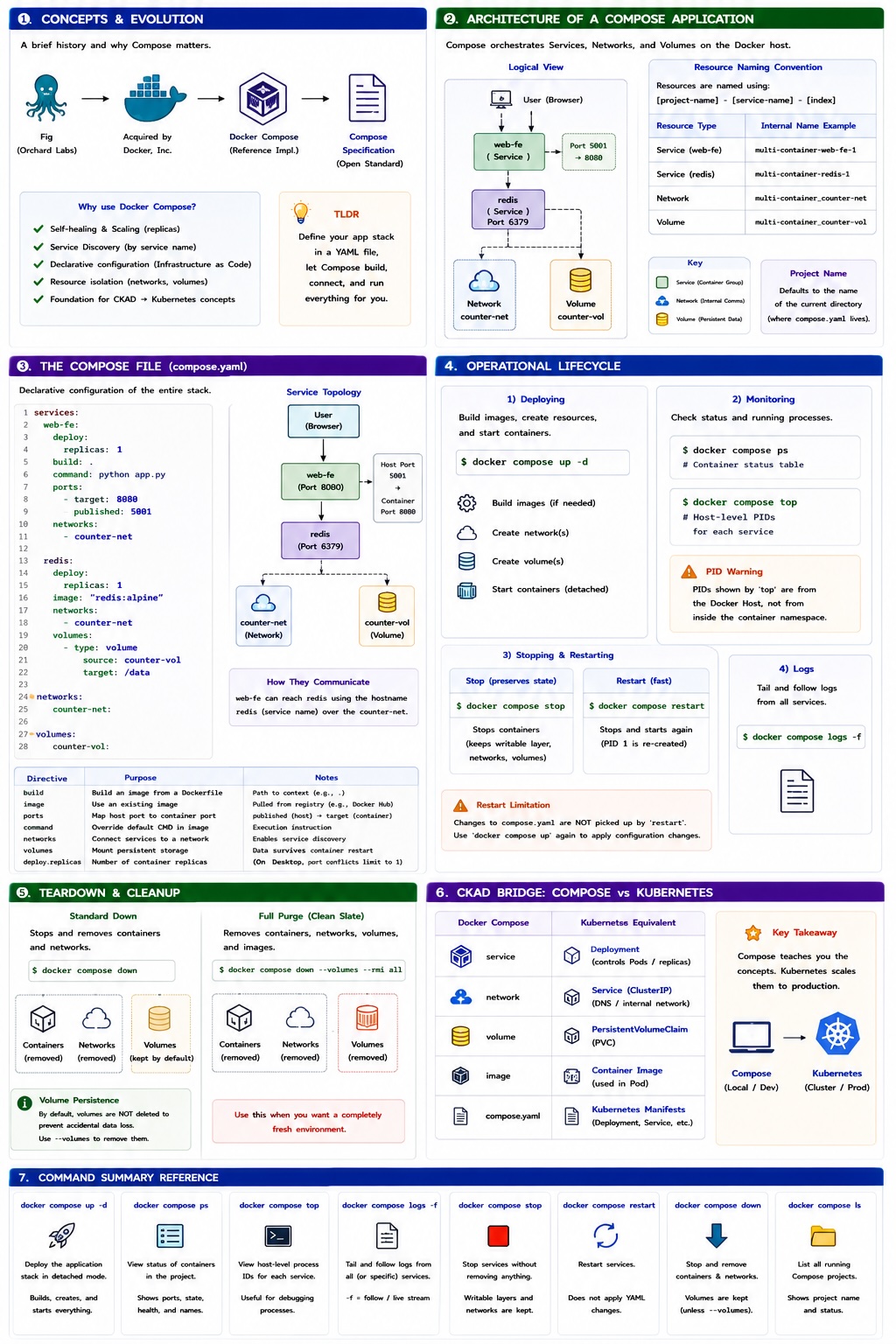
Docker Compose is a tool for defining and running multi-container applications. Instead of managing individual containers via complex CLI commands, Compose allows you to use a declarative YAML file to manage your entire application stack as a single unit.
1. Concepts and Evolution
The Journey from Fig to Compose
Originally, a tool called Fig (developed by Orchard Labs) revolutionized Docker by allowing users to define multi-container microservices in a simple YAML file. Docker, Inc. acquired Orchard Labs and rebranded Fig as Docker Compose.
Today, Compose is driven by the Compose Specification, an open community-led standard. While Docker Compose is the reference implementation, the specification ensures consistent governance across different platforms.
Why Use Compose?
While primarily used for development, testing, and CI/CD environments, Compose introduces concepts that are foundational for the CKAD (Certified Kubernetes Application Developer) exam:
- Self-healing & Scaling: Provides a simplified view of how microservices benefit from these patterns.
- Service Discovery: Allowing containers to communicate via service names rather than IP addresses.
- Declarative Configuration: Defining the "desired state" of your infrastructure in code.
- Resource Isolation: Automatic creation of dedicated networks and volumes.
2. Architecture of a Compose App
When you deploy an application, Docker Compose parses your YAML file and orchestrates the creation of several objects: Services, Networks, and Volumes .etc
Resource Naming Conventions
Docker assigns a Project Name based on the directory name of your build context. It then names resources using the pattern: [project-name]-[service-name]-[index].
| Resource Type | Internal Name Example |
|---|---|
| Service | multi-container-web-fe-1 |
| Network | multi-container_counter-net |
| Volume | multi-container_counter-vol |
It names resources using a predictable pattern to avoid conflicts.
3. The Compose File (compose.yaml)
Compose looks for a file named compose.yaml or compose.yml by default.
!!! tip "Standard Filenames"
Modern Docker standards prefer compose.yaml. If you use a custom name like prod.yaml, you must specify it using the -f flag:
docker compose -f prod.yaml up.
Sample Application Configuration
The following example defines a web frontend and a Redis backend.
services:
  web-fe:
    deploy:
      replicas: 1
    build: .
    command: python app.py
    ports:
      - target: 8080
        published: 5001
    networks:
      - counter-net

  redis:
    deploy:
      replicas: 1
    image: "redis:alpine"
    networks:
      - counter-net
    volumes:
      - type: volume
        source: counter-vol
        target: /data

networks:
  counter-net:

volumes:
counter-vol:Key Directives Explained
services: The mandatory top-level key defining the application components.build: .: Directs Docker to build an image from the Dockerfile in the current directory.image: Specifies an existing image to pull (e.g., from Docker Hub).ports: Maps the container port (target) to the host port (published).command: The execution instruction.networks: Connects containers to a shared network. This enables Service Discovery, allowing web-fe to reach redis simply by using the hostname redis.volumes: Mounts a persistent volume. This ensures data is not lost if the container is stopped or deleted.deploy.replicas: Defines the number of containers.
!!! info "" On Docker Desktop, you can usually only run 1 replica for services that bind to a specific host port (e.g., 5001), as multiple containers cannot bind to the same host port simultaneously.
4. Operational Lifecycle
Deployment and Management
=== "Deploying" The up command is the primary way to deploy. It builds images, creates networks/volumes, and starts containers.
```bash
    # Start in the background (detached mode)
    docker compose up -d
```
=== "Monitoring"
Check the health and processes of your multi-container stack.

```bash
# List container status, ports, and state
docker compose ps
# List processes running inside each container (Host PIDs)
docker compose top
```

!!! warning "Process IDs (PID)"
    The PID numbers returned by `docker compose top` are the PIDs as seen from the **Docker Host**, not from within the container's isolated namespace.
=== "Stopping & Restarting"
Stop the app without deleting resources, or perform a restart.

```bash
# Stop containers (preserves container state)
docker compose stop
# Restart stopped containers
docker compose restart
```


!!! warning "Restart Limitation"
docker compose restart does not pick up changes made to the compose.yaml file. To apply configuration changes, you must run docker compose up again (which performs a recreation of affected services).5. Teardown and Cleanup
=== "Standard Down" Stops and removes containers and networks.
```bash
docker compose down
```

!!! info "Persistence of Volumes"
    By default, docker compose down does not delete volumes. This is a safety feature to prevent accidental data loss. You must explicitly use the `--volumes` (or `-v`) flag to remove them.
=== "Full Purge" Removes volumes and images along with containers. Use this to ensure a completely clean slate.
```bash
docker compose down --volumes --rmi all
```6. CKAD Bridge: From Compose to Kubernetes
For those transitioning to Kubernetes, use the following mental model to map Compose concepts to K8s objects:
| Docker Compose | Kubernetes Equivalent |
|---|---|
service | Deployment (controls Pods/Replicas) |
network | Service (DNS/ClusterIP) |
volume | PersistentVolumeClaim (PVC) |
image | Container image inside a Pod |
compose.yaml | Kubernetes manifests (multiple YAML files or Helm Charts) |
7. Command Summary Reference
| Command | Description |
|---|---|
docker compose up -d | Deploy the application stack in detached mode |
docker compose ps | View the status of containers in the current Compose project |
docker compose top | View host-level process IDs for each service |
docker compose logs -f | Tail and follow logs for all services in the stack |
docker compose stop | Stop services without removing containers or networks |
docker compose down | Stop and remove containers, networks, and related resources |
docker compose ls | List all running Docker Compose projects on the host |