
5. The Docker Engine: Architecture and Evolution
The Docker Engine is the core server-side technology used to create, manage, and run containers. While often discussed as a single entity, the modern Engine is a modular ecosystem of specialized, high-performance tools.
🏗️ From Monolith to Modularity
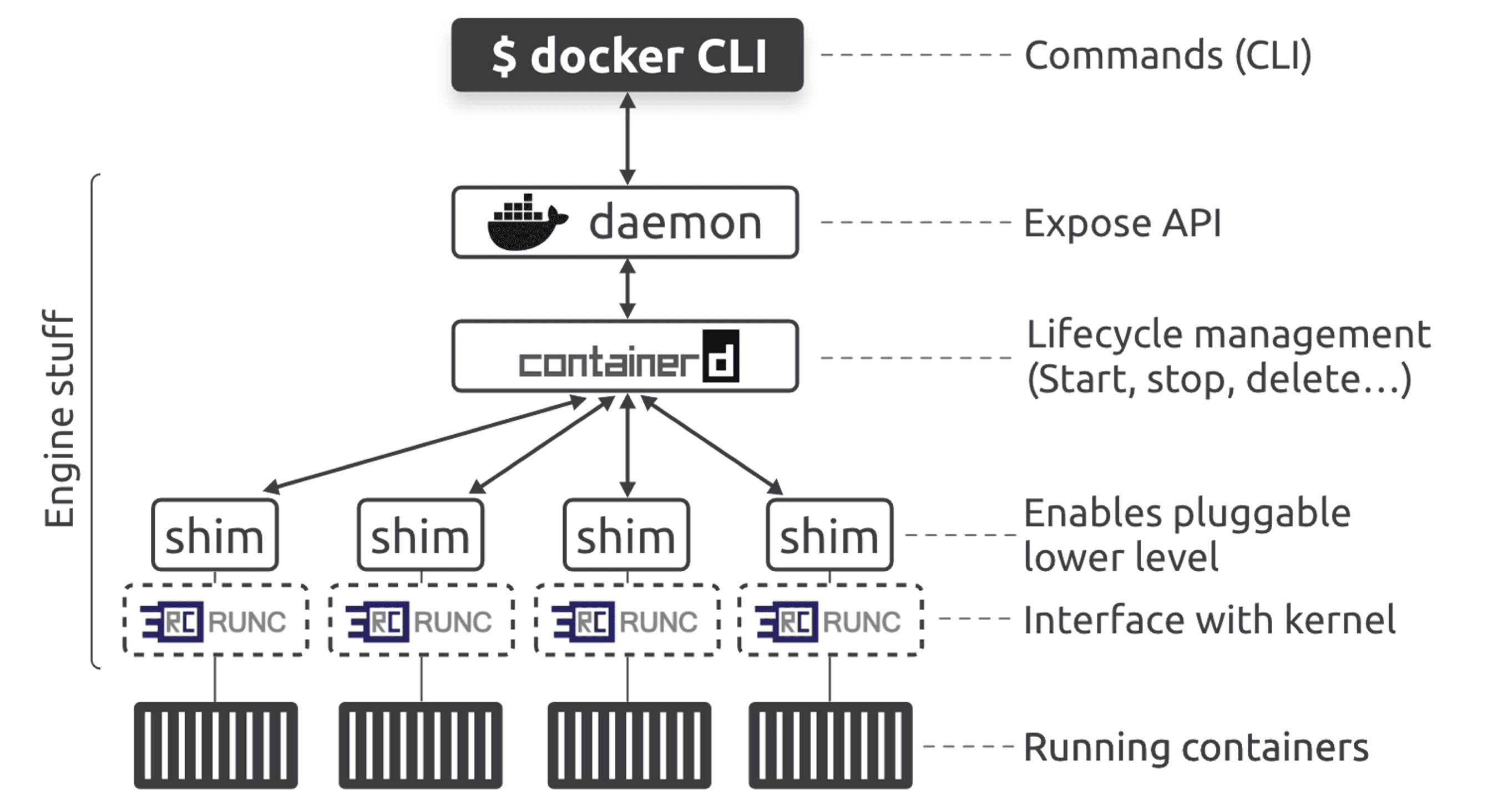
Originally, the Docker Engine was a monolith. Almost all functionality—the API, the image builder, the runtime logic—was baked into a single massive binary called the Docker daemon (dockerd).
To promote industry standards and allow other platforms (like Kubernetes) to reuse its components, Docker refactored the Engine. This "Big Break-up" moved low-level and high-level runtime logic into dedicated, specialized tools.
⚖️ The Influence of the Open Container Initiative (OCI)
The OCI is a governance body that ensures container tools are interoperable. They maintain three critical specifications:
- Image Specification (image-spec): Defines the structure of the container image file.
- Runtime Specification (runtime-spec): Defines how a container should be run (filesystem, resources, etc.).
- Distribution Specification (distribution-spec): Standardizes how images are pushed and pulled from registries.
Docker's Implementation:
- runc: The reference implementation of the OCI runtime-spec.
- BuildKit: The engine used to build image-spec compliant images.
- Docker Hub: An OCI-compliant registry following the distribution-spec.
⚙️ High-Level vs. Low-Level Runtimes
Modern container management is split into two distinct stages:
| Component | Level | Role |
|---|---|---|
| containerd | High-Level | Manages the container lifecycle (start, stop, pause), pulls images, manages networks, and handles volumes. |
| runc | Low-Level | A lightweight CLI that interfaces with the Linux Kernel (Namespaces/cgroups) to actually "carve out" the container. |
Note: As of Docker Desktop 4.27.0, image management has been fully offloaded from the daemon to
containerd, making the system even more modular and efficient.
🚀 The Life of a "docker run" Command
When you execute a command to start a container, a sophisticated relay race occurs:
- The Client: The CLI converts your command into a REST API request.
- The Daemon: The request hits
dockerd. The daemon interprets the intent and communicates withcontainerdvia a gRPC API. - containerd: It pulls the image if necessary and converts it into an OCI Bundle.
- runc:
containerdtellsruncto use the bundle to create the container.runcspeaks to the kernel to set up namespaces and cgroups. - The Hand-off: Once the container process starts,
runcexits immediately, leaving the container running as a child of a Shim.
🛡️ The Role of the Shim
The Shim is a small process that sits between containerd and the container. It is the secret to Daemonless Containers.
- Process Persistence: Because the shim becomes the parent of the container, you can restart or upgrade the Docker daemon (
dockerd) without killing your running containers. - I/O Management: The shim keeps the STDIN and STDOUT streams open so that if the daemon restarts, the container doesn't crash due to broken pipes.
- Runtime Agnostic: Shims make it possible to swap
runcfor other runtimes (like Kata Containers or gVisor) without changing how Docker or Kubernetes works.
📁 Linux Implementation: The Binaries
On a Linux host, you can see the modularity in action by looking at the process tree (ps -ef). You will find these distinct binaries:
/usr/bin/dockerd: The API gateway and orchestrator./usr/bin/containerd: The high-level lifecycle manager./usr/bin/containerd-shim-runc-v2: The "babysitter" for the running container./usr/bin/runc: (Visible only during the split-second of creation).
❓ Do We Still Need the Daemon?
If containerd does all the heavy lifting, why keep dockerd?
The daemon still provides the essential user-facing API. It handles image building (via BuildKit), logging, authentication to registries, and advanced networking features that are more "opinionated" than what a raw runtime like containerd provides. It is the user-friendly wrapper around the complex, modular engine underneath.